Psychro Calc Pro for Mac: quick start guide
From installing Psychro Calc Pro on your Mac to your first psychrometric calculation, the point on the live chart and a PDF report. The example is 25 °C dry-bulb temperature and 50% relative humidity.
-
Download the app from the Mac App Store
Download Psychro Calc Pro from the Mac App Store and open it from Launchpad or Applications. It needs macOS 10.15 (Catalina) or later; no account is needed.
-
First launch and the 7-day free trial
The free trial starts the first time you open the app and lasts 7 days, with every feature available. A strip above the chart shows the days left; on the last day it turns red.

The trial strip with the days left. When the trial ends, the purchase screen opens. Unlock Premium is a one-time purchase, priced by the Mac App Store in your currency. Already bought it? Click Restore Purchase.
The chart and results table are on the left; the display, toolbar, parameter buttons and keypad on the right. The window opens at 1280 × 800, which is also its minimum size; you can make it larger. On a screen with less usable space, it opens at the size that fits.
-
Calculate from two known values: 25 °C / 50% RH
- Under SELECT PARAMETER, click Tdb. The display reads ENTER Dry Bulb Temp VALUE.
- On the on-screen keypad or the keyboard, press 2, 5, then ENTER (Return on the keyboard). The display reads SELECT 2ND PARAMETER.
- Click RH and enter 5, 0.
- Click ENTER. The display reads CALCULATION COMPLETE, the table fills in and the point is drawn on the chart.
Any two of Tdb, Twb, Tdp, RH, W and h work as a pair, except Tdp + W. Use a point as the decimal separator and +/- for negative values.
The default altitude is 0 m; set another with Alt and ENTER. It applies from the next calculation.
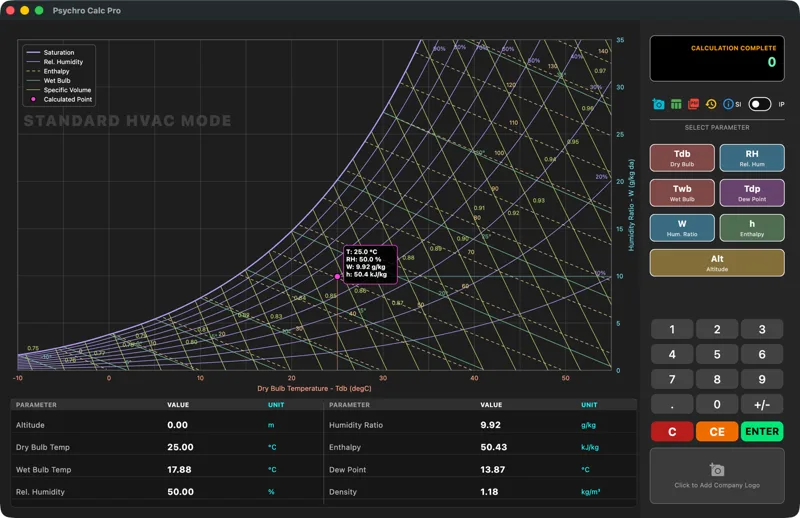
After the 25 °C / 50% RH calculation. -
Read the results
The table below the chart shows eight results. SI values for 25 °C / 50% RH at 0 m:
Name in the table Property Value Altitude Altitude 0.00 m Dry Bulb Temp Dry-bulb temperature 25.00 °C Wet Bulb Temp Wet-bulb temperature 17.88 °C Rel. Humidity Relative humidity 50.00 % Humidity Ratio Humidity ratio 9.92 g/kg Enthalpy Enthalpy 50.43 kJ/kg Dew Point Dew-point temperature 13.87 °C Density Density 1.18 kg/m³ Humidity ratio and enthalpy are per kilogram of dry air; density is a result only.
-
Explore the point on the live chart
The point is a pink-purple marker with an info box (T, RH, W, h). The range follows the point’s temperature: STANDARD HVAC MODE, LOW TEMP MODE below −10 °C, INDUSTRIAL DRYING MODE above 60 °C.
- Scroll wheel or trackpad pinch: zoom.
- Click and drag: pan.
- Double-click or ⌘0: automatic view.
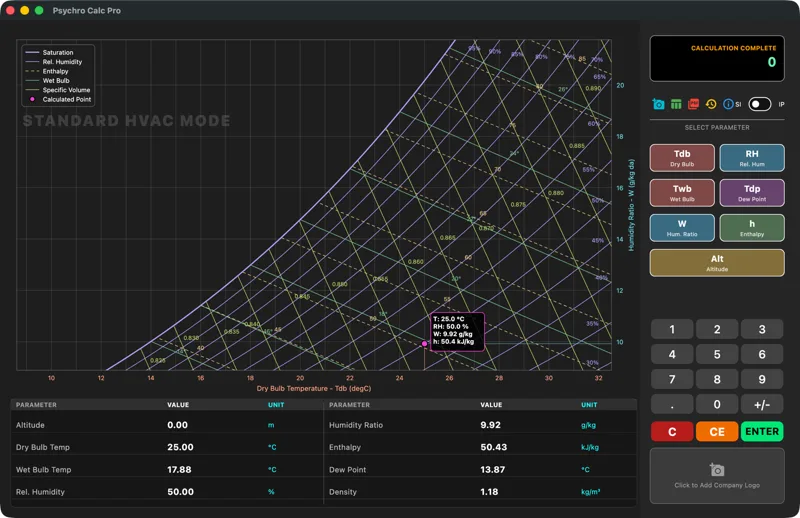
Zoomed in: the lines are redrawn for the new range. -
Switch between SI and IP units
Use the SI / IP switch at the right of the toolbar. IP uses °F, gr/lb, Btu/lb, lb/ft³ and ft. Switching keeps your calculation: the values you entered are converted (25 °C / 50% RH → 77 °F / 50% RH) and the result is calculated again. The altitude stays.
The results table, chart (axes in °F and gr/lb), info box, PDF and history all follow your choice.
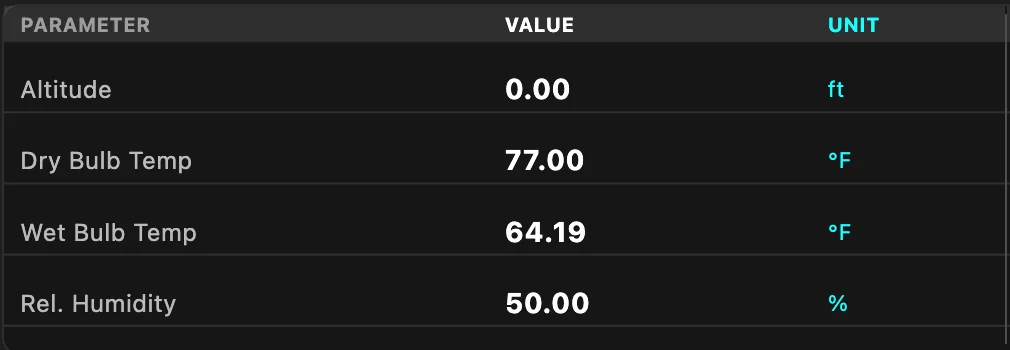
IP units: 77 °F / 50% RH. -
Use the calculation history
Every successful calculation is saved with its altitude; the list keeps the last 50. Click the History icon:
- Load: restores the calculation and its altitude.
- Rename: names the entry, for example “Office summer design”.
- The red bin deletes at once; the top-right icon clears everything after asking.
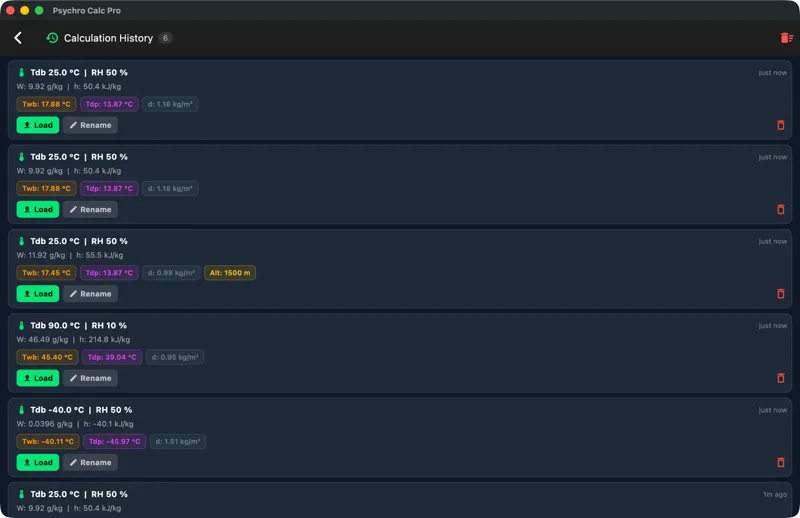
History: load, rename, delete. -
Create a PDF report and find where it is saved
After a calculation, click the red Export PDF icon. The report is saved without a dialog, in the app’s own documents folder.
- A Finder window opens with the new file selected, ready to move or share.
- The display shows PDF saved: and the full path.
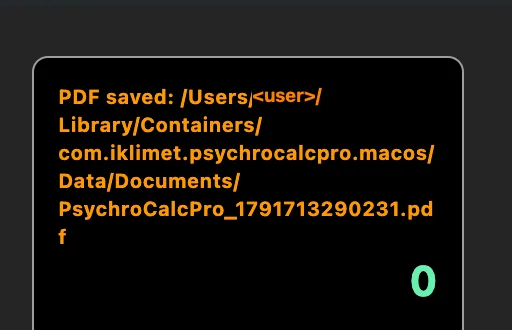
The “PDF saved” message (user name hidden). The report is one A4 page: date and time, app version, the chart as on screen (zoom included) and the results table. For your logo, click Add Logo first; it is kept between sessions, without the image’s metadata. Without a result, the display shows CALCULATE FIRST!.
Frequently asked questions
I typed a wrong digit. How do I fix it?
CE deletes the last digit. C clears the results, inputs and chart, but not the altitude.
Does the chart follow the SI/IP switch?
In IP the chart, its info box, the results table and the PDF use °F, gr/lb and Btu/lb.
I bought the app. How do I use it on another Mac?
Install it with the same Apple Account and, if asked, click Restore Purchase; you do not pay again.
Every feature and message is described in the Psychro Calc Pro for Mac user guide (PDF, 29 pages). For an overview, see the Psychro Calc Pro for Mac product page. To try the chart without the app, use the free online psychrometric chart.